📍 Generic objects
If you'd like to test any other detection model that has no ready-to-use runner, you can use the generic run-model command. It works similarly to other runners, but allow downloading any Hugging Face model, or use a custom local model you may have trained by yourself.
In order to detect features based on Panoramax pictures, you can download them from a public API using panoramax_cli:
panoramax_cli download \
    --api-url https://panoramax.ign.fr \
    --user me \
    --path /path/to/downloaded/pictures \
    --file-name id \
    --external-metadata-dir-name meta \
    --quality sd
Info
You must set --file-name id and --external-metadata-dir-name meta for Prolix to work.
Then, run the model of your choice with commands below, depending on if you use a local model or one from Hugging Face.
To run a Hugging Face model, you need two informations:
- The model name, which is usually formatted like
Organization/model-name. It appears on top-left of a model page, and in page URL as well. Here, let's say we use theUWyo/wildlife-mule-deerto detect deers.
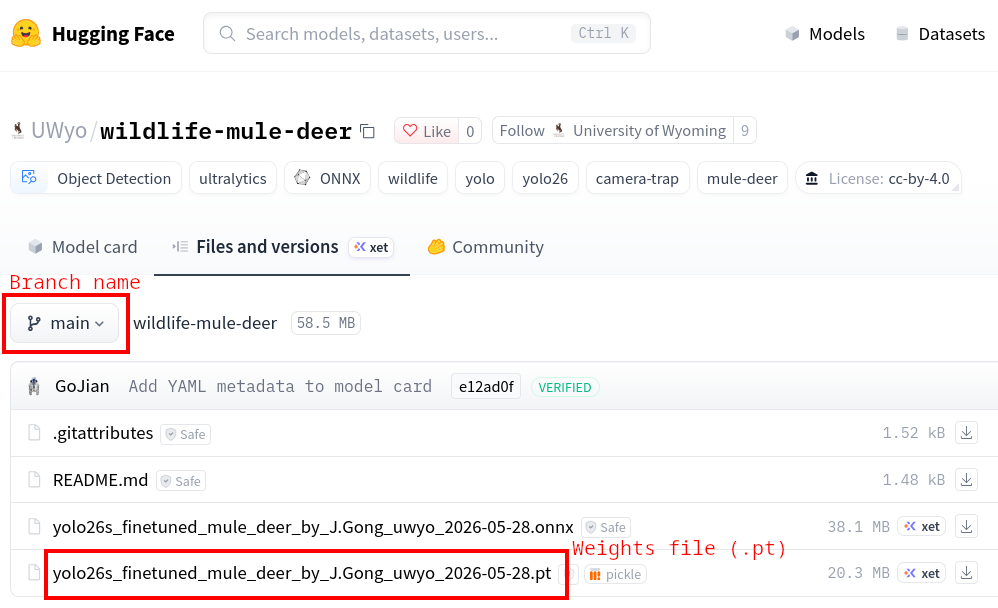
- The branch name and weights file name. These info appear in Files and versions tab. Branch name is located in a dropdown under Model card tab. Weights file name correspond to the filename in list ending with
.ptextension. In this example, branch name ismainand weights file name isyolo26s_finetuned_mule_deer_by_J.Gong_uwyo_2026-05-28.pt.
Other information to set include:
- A custom ID that you set to any value, that is used to generate output file names. Here, let's use
deer. - A Panoramax key, that may correspond to a semantic tag that could be used by Panoramax annotations. This is important if you plan to upload your annotations. Here, let's say we use
wild_animal.
All together, this gives the following command:
To run a local model you may have found or trained, you just need the path to the weights file (file ending with .pt extension). For the example, let's say you want to detect deers. Beyond the weights filename, you may set:
- A custom ID that you set to any value, that is used to generate output file names. Here, let's use
deer. - A Panoramax key, that may correspond to a semantic tag that could be used by Panoramax annotations. This is important if you plan to upload your annotations. Here, let's say we use
wild_animal.
All together, this gives the following command:
Once finished, an output annotations_deer.geojson file is available, with detections found in your pictures dataset.
Info
The generic runner doesn't offer any de-duplication, just raw output from detection model. If you'd like a finer analysis, you may create a custom analyzer to further define what you expect.